
Welcome
RamAIn is a general automation platform that specializes in UI automation. Learn how Workflows and Agents combine into end-to-end automations you can build, publish, and operate from one workspace.
RamAIn is a general automation platform with one defining specialty: it can automate the parts of your work that only exist behind a user interface. Plenty of tools can call an API or run a script. Very few can log in to a vendor portal, fill a twelve-field form, download the confirmation PDF, and do it reliably every day. RamAIn does both, in the same workspace, as one automation.
The platform gives you two surfaces that work together:
- Workflows capture the UI work. You demonstrate a browser task once, in plain English, and RamAIn compiles it into a reusable automation.
- Agents orchestrate everything around that work: API calls, code, data transformation, LLM steps, loops, approvals, and your published workflows, assembled into one end-to-end pipeline.
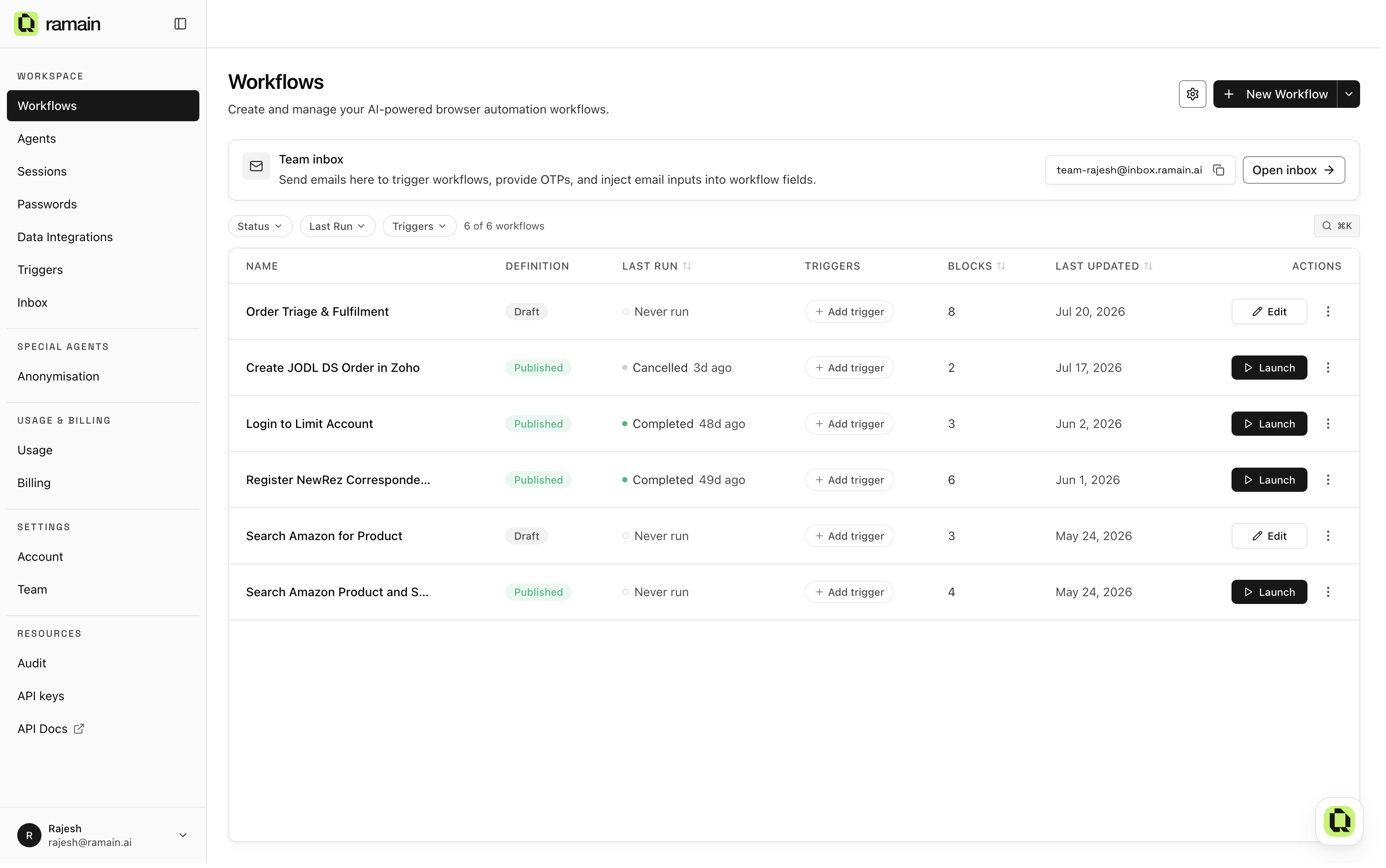
Sign in and you land on Workflows, your team's automation library. Every automation your team builds lives here, with its status, triggers, and run history. This is where every build starts: click New Workflow and you are teaching an agent within seconds.
What people automate with RamAIn
The common thread is work that crosses systems, especially systems without a usable API:
- Reading orders from one system and entering them into another vendor's portal, every day, without a person retyping fields.
- Pulling a report from a supplier website each morning and emailing a summary to the team.
- Watching a shared inbox for incoming requests and processing each one through an internal web app.
- Fetching records over an API, running a browser task for each record, and delivering the combined results as a CSV.
If a task can be described to a capable colleague, it can usually be described to RamAIn.
Two surfaces, one platform
Workflows: teach the UI work by showing it once
A workflow is a reusable browser automation. You do not script it, record brittle clicks, or maintain selectors. Instead, you open the workbench, get a dedicated cloud browser in seconds, and tell the agent what to do the way you would brief a colleague. The agent drives the browser in full view, narrating each step, asking questions when it is unsure, and handing control back to you whenever you want it.
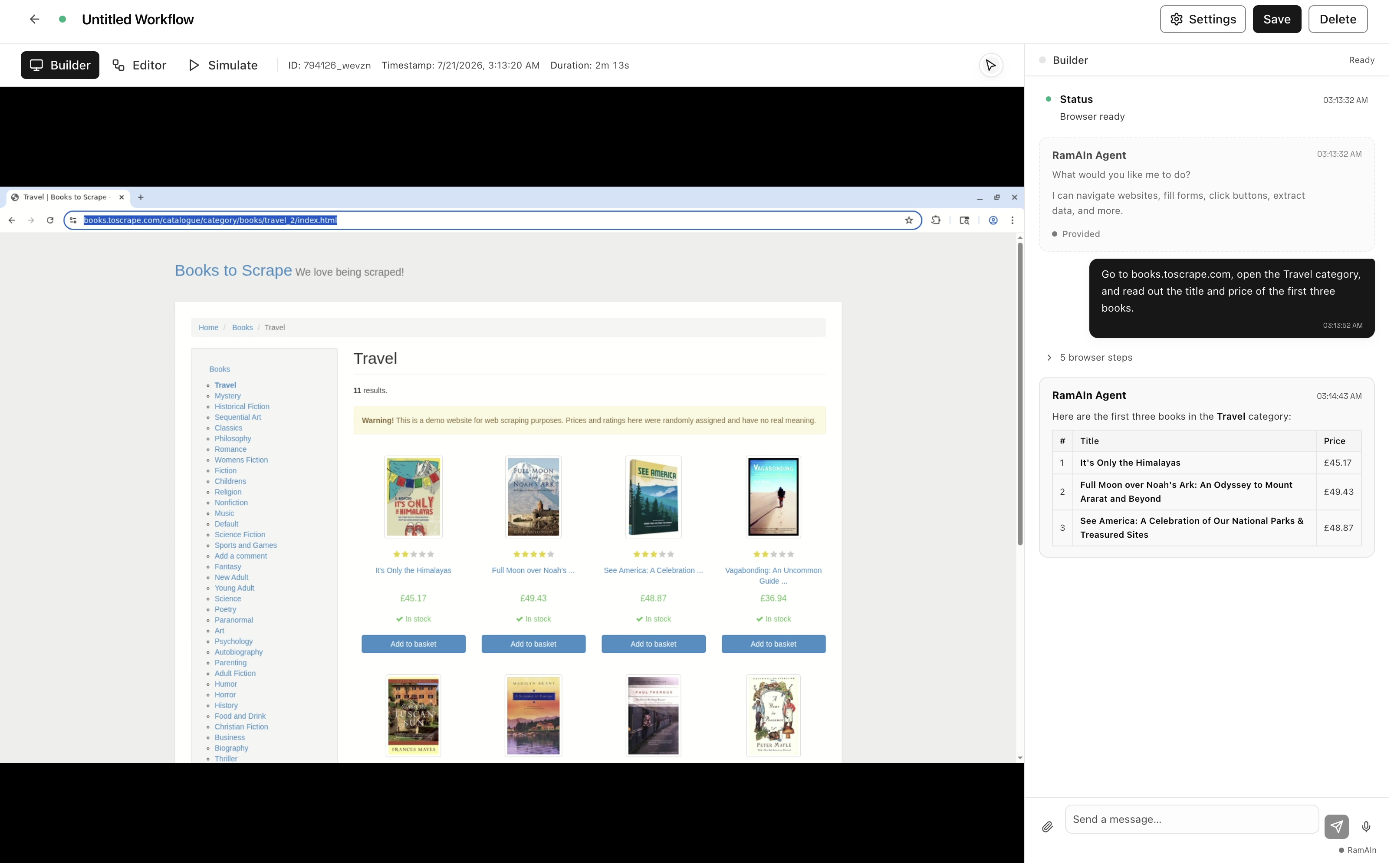
When the task is done, one click compiles the whole session into a workflow you can read at a glance: inputs for the values that change per run, agent steps that do the work, parsers that structure the results, and conditions where the task branches. From there you refine it by chatting with the Editor, publish it, and launch it on demand, on a schedule, from an email, or through the API.
Start with the Quickstart or the full Workflows guide.
Agents: orchestrate the whole pipeline
An agent is a larger automation built on the Agents page. You describe the end-to-end job in chat, and a builder assembles it node by node on a live canvas: API calls, Python or TypeScript code, LLM steps, loops, waits, approvals, and your published browser workflows as callable steps inside the same graph.
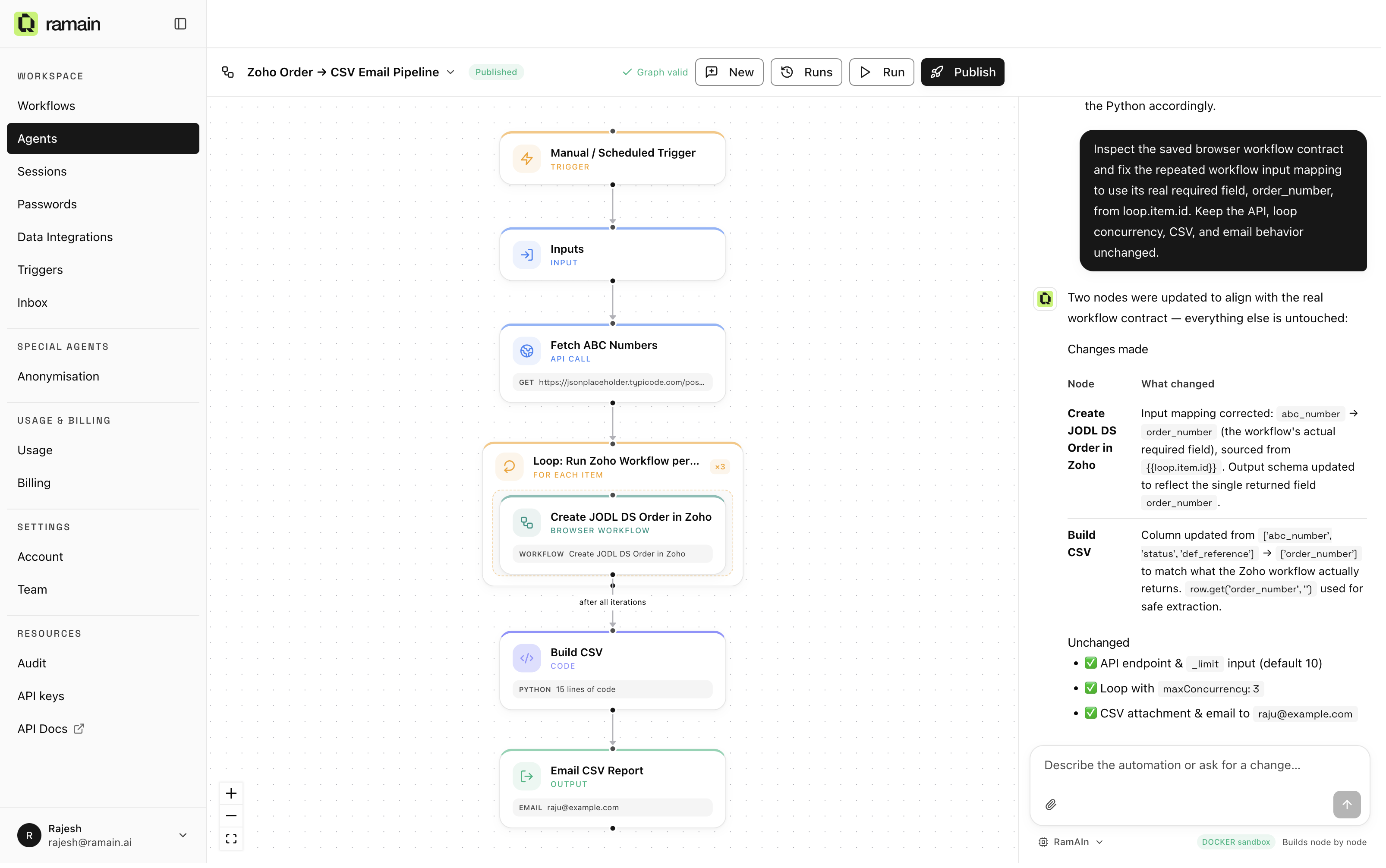
A useful way to hold the two surfaces in your head: a workflow is the hands, and an agent is the plan. The most common pattern is exactly that shape. An agent fetches ten records from an API, loops over them running a browser workflow for each, post-processes the results with a code step, and emails the output. Every workflow your team publishes becomes a ready-made building block for your agents.
Read more in the Agents guide.
The lifecycle at a glance
Both surfaces follow the same rhythm: build, save, edit, publish, operate.
Step 1
Build. Open the workbench and tell the agent what to do in plain English. For workflows, that means demonstrating the task in a live cloud browser while the agent narrates. For agents, it means describing the pipeline while the builder assembles nodes on the canvas in front of you.
Step 2
Save. One click compiles a workflow session into a readable graph: inputs, agent steps, parsers, and conditions. The compiler is smart about what should be reusable. If you said "the order number changes every time", it becomes an input you fill at launch.
Step 3
Edit. Refine by chatting with the Editor. Add a branch for the out-of-stock case, wire in a saved Password so the agent can sign in, attach a reference spreadsheet to the datastore, or change what the workflow returns. No separate edit mode, no code.
Step 4
Publish. Publishing turns a draft into a launchable automation. It appears with a Launch button for the whole team, its email and schedule triggers go live, and it is exposed as a REST endpoint your systems can call.
Step 5
Operate. Watch runs live, replay history on the Sessions page, generate a Visual SOP that documents exactly what a version does, and let the platform pause for a human only when a step genuinely needs one.
Everything in the workspace
Automations do not run in a vacuum. Your workspace ships with the operational layer around them, shared by the whole team:
- Team and sub-organizations. Invite colleagues, assign Admin, Builder, or Member roles, and split larger companies into sub-organizations that share one billing account. Anything one builder publishes is instantly launchable by the rest of the team.
- Team inbox and phone. Every workspace gets its own email address and phone number. Incoming mail can trigger workflows and feed them inputs; inbound SMS supplies one-time passcodes to runs that hit a verification screen.
- Passwords. Store credentials once, by website.
Workflows reference them as
#keytokens, and the secret values never appear in chats, graphs, or API payloads. - Sessions. One view of every live and past run across the workspace: watch a run in progress, replay a finished one step by step, and see exactly what the agent saw.
- Visual SOPs. Generate a screenshot-grounded, step-by-step slideshow for any workflow version. Perfect for auditors, trainers, and colleagues who never open RamAIn.
- Usage, billing, and audit. Usage analytics break credit consumption down by feature and period, Billing shows balance and top-ups, and admins get an immutable audit log of team, workflow, trigger, and API-key events.
- Integrations. Connect organization data sources such as Microsoft OneDrive once, then import spreadsheets, PDFs, and reference files straight into any workflow's datastore.
Where to start
Build, publish, and launch your first workflow in about ten minutes. No setup, nothing to install.
The vocabulary used across the product: workflows, agents, runs, blocks, inputs, triggers, and more.
The three phases of a workflow: Build, Edit, and Test, with every tool available in each.
Compose APIs, code, LLM steps, loops, approvals, and your workflows into end-to-end automations.
Run automations manually, on a schedule, from an email, or through the API.
Launch published workflows from your own systems with a single POST.
More resources
- Pricing: SaaS and Enterprise pricing models.
- Privacy & Security: certifications, controls, and deployment options.
- Infrastructure: the on-premises AWS reference architecture for enterprise deployments.
Was this page helpful?